
How To
How to download and update to Evernote 5

- November 2, 2012
- Updated: July 2, 2025 at 8:42 AM

Update: There is now a direct download for Evernote 5 available.
Evernote is one of the most popular free productivity apps for Mac and the long-awaited release of version 5 introduces a 100 new features for users to enjoy.
As yet, there is no direct download for Evernote 5.0 but you can upgrade by following these simple instructions:
1. Download and install Evernote 3.3. Note that you must install this download – you cannot upgrade by downloading the version in the Mac App Store and then applying step two.
2. Go to Preferences and select the Software Update tab and check the box Update to beta versions when available.
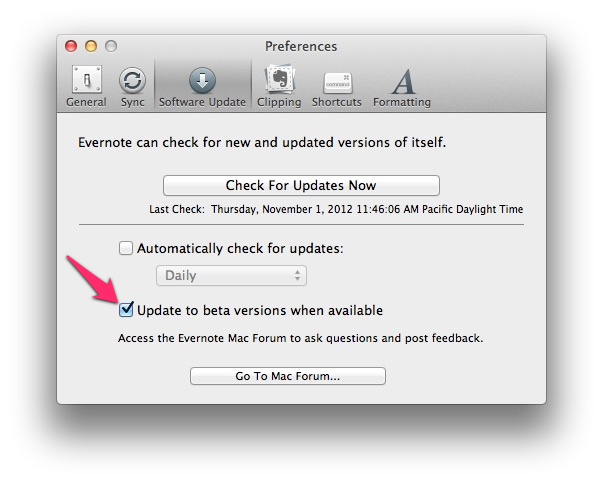 Evernote will then automatically update to version 5.0. If you have any problems, try closing and restarting the app.
You may also like
 News
NewsSecure Your Sleigh: How to Dodge Online Scams This Holiday Season
Read more
 News
NewsThe Studio Ghibli shorts that you will never be able to see (unless you pay a lot of money in Japan)
Read more
 News
NewsGmail Help Me Write with Gemini: 7 Ready-to-Use Prompts for Complaints, Sales & Internal Memos
Read more
 News
NewsZootopia 2 is the highest-grossing movie of 2025
Read more
 News
NewsAvatar: Fire and Ash is so expensive that it could very well dominate the box office and be an absolute failure
Read more
 News
NewsEditing Offline: What Photoshop’s On-Device AI Can Do
Read more